
Google Ad's - Untangled
The Ultimate, Always-Useful Guide to Google Ads (2025) : From Goal → Campaign → Settings → Measurement
This playbook maps directly to mind map: audience temperature (cold / mid / warm), business goals (sales, leads, traffic, app, awareness), and Google’s current campaign lineup (Search, Performance Max, Demand Gen, Display, Shopping, Video/YouTube, App). For each goal you’ll find: the campaigns to run, the exact settings to use, creative/asset checklists, measurement stack, and when to scale or stop. I’ve also injected the latest feature changes, benchmarks, and case studies so this article stays decision-ready when you revisit it.
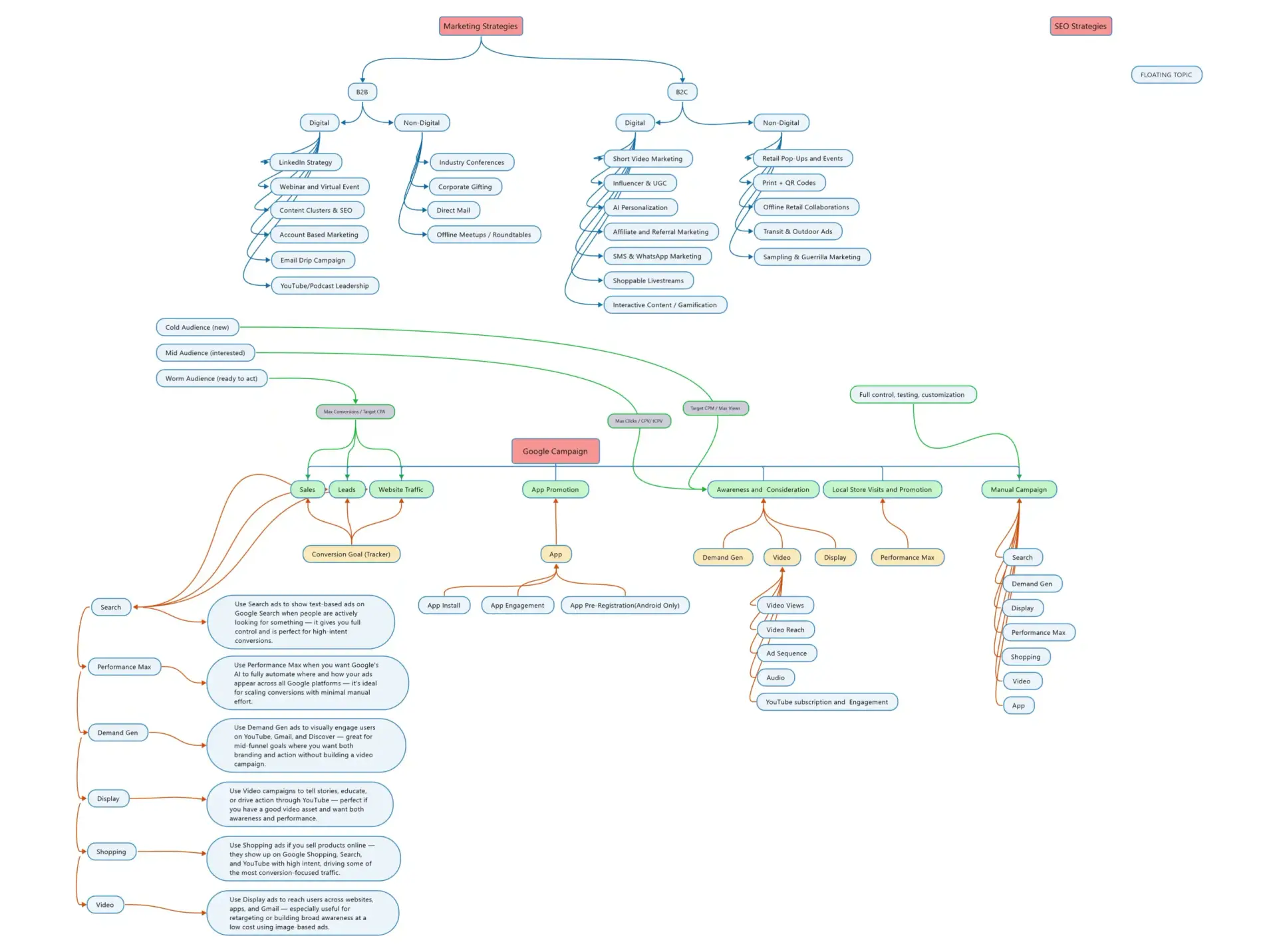
Pick your audience temperature and business goal
Warm (ready to act): remarketing, high intent, brand search
Goals: Sales / Leads / App events
Run: Search (brand + high-intent NBR), PMax (with brand exclusions if splitting), Remarketing via Demand Gen/Video/Display
Why: Highest conversion propensity; protect and harvest bottom-funnel efficiently.
Mid (interested but not yet converting)
Goals: Sales / Leads / Consideration
Run: Demand Gen (conversion objective), YouTube (Video Action / Video reach for consideration), Display remarketing, PMax to expand similar intent
Why: Visual + social-style placements move users from consideration to action, especially Shorts/Discover.
Cold (net new demand)
Goals: Awareness / New customer acquisition / App installs
Run: YouTube video reach campaigns (incl. Shorts), Demand Gen (reach/views objective), PMax (new customer acquisition setting for retail), Broad-match Search with smart bidding for proven offers
Why: Scale discovery at efficient CPMs, let AI find lookalikes then retarget.
Goal → Campaign recipes (with precise settings)
Sales (ecommerce)
Performance Max (Retail) + Shopping feed via Merchant Center Next
Bidding: Maximize conversion value with tROAS after learning (start without target if volume is low). Aim ≥30–50 conv./month per campaign before layering a hard tROAS. Store GrowersDefine Digital Academy
Controls:
Brand exclusions on non-brand PMax (Shared Library → Brand list) to keep brand and non-brand budgets separate. Google HelpBrightBid
Search themes (up to ~25) only to steer early learning—don’t overstuff. WordStreamThe PPC Agency You’ve Been Searching For
Assets: Full set of headlines/descriptions, image sizes, logo variations, 3–5 short videos (9:16, 1:1, 16:9).
Feed hygiene in MCN: fix GTIN/brand, availability, pricing, shipping; use attribute rules (MCN) for mapping and enrichment. SEO.AI
When to split into multiple PMax: distinct margin tiers/categories or geo; ensure each has enough conversions. Store Growers
Search – non-brand (exact/phrase + broad)
Bidding: Max conv. value or Max conv. with tCPA/tROAS after data accrues.
Keywords: Use broad for coverage paired with smart bidding + robust negatives.
YouTube & Demand Gen (prospecting + remarketing)
Objectives: Sales or Views; include Shorts assets; build sequences (awareness → benefit → offer). Google Help+1
Leads (B2B/B2C services)
Primary picks
Search – high intent (service + geo + pain keywords)
Bidding: Max conversions → tCPA after stability.
Ads: RSA with ad customizers for city/price; call assets & structured snippets.
Performance Max (Lead gen)
Use Final URL expansion limited to relevant sections; upload form-fill/value signals; exclude brand to avoid cannibalizing brand Search. Google Help
Demand Gen (conversion objective) for net new interest + Video for consideration.
Lead quality guardrails
Prefer sending to high-intent landing pages; if testing Lead Form Assets, integrate to CRM + score fast—many advertisers report mixed quality. HawkSEMReddit
Measurement
Enhanced Conversions for leads (hash user data); Offline conversion import with qualifiers (SQL, revenue, pipeline stage) so Smart Bidding learns from qualified outcomes. Consent Mode v2 required for durable modeling. StapeGoogle Help
Case proof: B2B lead gen campaigns commonly show CPL reductions by tightening qualification + offline signals (public case studies demonstrate large % improvements). Llama Lead GenTGQ Marketing
Website traffic (cheap visits with brand safety)
Run: Search (broad + maximize clicks) for cheap tests; Display with optimized targeting off (for control), strict content suitability and placements; Demand Gen (views) to drive engaged sessions.
Settings to watch: frequency caps (Video/Display), inventory type (expanded/standard/limited), and content exclusions (DL-MAs, sensitive categories). Google Help
Awareness & consideration (video-first)
Run: Video Reach campaigns mixing bumper + skippable + Shorts; Ad sequencing for storytelling; Demand Gen (views) across YouTube/Discover/Gmail.
Bidding: CPM for reach; CPV for views where available.
Creative structure: 6s bumpers for memory cues, 15–30s for story, 9:16 cut-downs for Shorts. Google Help+1
Local store visits & promotions
Run: PMax with store goals (enable store visits calls, directions), Local Services Ads (if eligible vertical), Search + location assets with radius bid adjustments.
Measurement: Ensure store visit eligibility; import POSevents if possible via Ads Data Manager. Google Help
App promotion
Run: App campaigns (Install / App engagement / App pre-registration for Android) with SDK/GA4 Firebase linking; provide text, images, video, HTML assets; value-based bidding for in-app actions once signals accrue. Google Business
“Minute settings” you’ll keep reusing (by campaign)
Search
Networks: Search only (uncheck Display expansion for control).
Keywords: Start with phrase/exact for proven intent; test broad + smart bidding once negatives and conversions are robust.
Brand vs non-brand: Separate campaigns/budgets.
Ad rotation: Optimize (only mode); pin essential headlines if compliance requires.
Assets: Sitelinks, callouts, structured snippets, call, price, image.
Locations: Presence only (exclude “interest” unless you sell remotely).
Ad schedule: Align to staffed hours if sales are phone-driven.
Bidding: Max conv/conv value → tCPA/tROAS once stable.
Performance Max
Asset groups by product category/offer; 3–5 videos; feed attached (retail).
Audience signals: 1P data, custom segments (interests), similar segments are deprecated; use search themes to steer. WordStream
URL expansion: “Only send traffic to URLs I provide” when you need strict control.
Exclusions: Brand exclusions, account-level negatives. Google Help
Reporting: Asset group, search term insights, product filters.
Demand Gen
Placements: YouTube (incl. Shorts), Discover, Gmail.
Objectives: Sales/leads or views; retargeting and prospecting can be split.
Creatives: Multiple aspect ratios (9:16/1:1/16:9), carousels, video. Adsmurai
Video (YouTube)
Campaign type: Video Reach (reach) or Video Views (consideration) or Ad Sequence (story).
Formats: Bumper, skippable/non-skippable, in-feed, Shorts.
Controls: Frequency caps; content suitability/inventory. Google Help
Shopping / Merchant Center Next
Feed health: Titles, GTIN, images, price parity, shipping, returns.
MCN quirks: New UI + insights; expect some limitations vs classic—plan attribute rules for transformations. StubGroupgodatafeed.com
App
Linking: Google Ads ↔ Firebase/GA4; SKAdNetwork for iOS if applicable.
Bidding: Install volume first; switch to in-app action value once signals stabilize. Google Business
Creative checklists (by format)
Search RSA: 12–15 headlines (pin 1 USP if regulated), 4 descriptions, keyword + benefit + social proof + CTA.
PMax/Demand Gen images: 1200×1200, 1200×628, 960×1200; logo light/dark; product on white + lifestyle; ensure text-safe margins.
Video/YouTube: 6s bumper, 10–15s cut, 20–30s story, 9:16 Shorts; open with hook in 2s; show brand in first 5s; end card with offer. Use sequencing to progress the story. Google Help
Decision grid: “Which ads should I run for my goal?”
| Goal | Audience Temp | Primary Campaign(s) | Must-Have Settings | Expand With |
|---|---|---|---|---|
| Ecom Sales (profit) | Warm/Mid | PMax (Retail) | tROAS after learning, brand exclusions, search themes, MCN feed rules | Search non-brand; Demand Gen prospecting; YouTube sequences |
| Lead Volume (qualified) | Warm/Mid | Search (high intent) + PMax (Lead) | tCPA after data, URL expansion limited, offline conv. import, Enhanced Conversions | Demand Gen (conv. objective); YouTube retargeting |
| Website Traffic | Cold/Mid | Demand Gen (views), Search (maximize clicks) | Tight content suitability, frequency caps, placements | PMax (NCA) once pixel/consent ready |
| Brand Awareness | Cold | Video Reach (incl. Shorts) | Frequency cap, inventory type, multi-format assets | Demand Gen (views), Ad sequencing |
| Local Store Visits | Local | PMax (store goals) | Location extensions, calls/directions, store-visit tracking | Search with geo modifiers |
| App Installs / Actions | Cold/Warm | App campaigns | Firebase/GA4 linking, value-based bidding | YouTube for creatives; Demand Gen for retargeting |
Your recurring setup checklist (copy/paste for every new account)
Measurement first: GA4 linked, Consent Mode v2, Enhanced Conversions, offline conversions where applicable, Ads Data Manager connections. Google Help+1Stape
Structure: Separate brand vs non-brand, prospecting vs remarketing; 1 conversion action set per goal with clear values.
Asset completeness: Supply video for PMax/Demand Gen (or Google will auto-generate).
Retail feed: MCN diagnostics clean; shipping/returns configured; attribute rules applied. SEO.AI
Controls: Content suitability, inventory type, frequency caps, placements for video/display. Google Help
Launch targets: Start with Max conv/conv value; add tCPA/tROAS after data. Define Digital Academy
Weekly ops: Search/PMax term reviews, budget pacing, asset refresh, experiment one variable at a time.
Scaling Rules, Troubleshooting, and When to Pause
Scaling a Google Ads account isn’t just about adding budget—it’s about preserving efficiency while growing reach. Below are the core principles, pitfalls, and fixes you can use repeatedly.
Learning & Targets (Bid strategy stability)
Initial phase: Always launch on Max Conversions or Max Conversion Value without a hard tCPA/tROAS target. This lets the algorithm explore signals freely.
When to set targets: Only after ~30–50 conversions per campaign per month (higher is better, ideally 100+) should you add tCPA or tROAS.
Why: If you set targets too soon, Google constrains auctions → fewer impressions → slower learning → higher CPAs.
Scaling trick: Start with a looser tCPA/tROAS, then gradually tighten once volume stabilizes.
Warning sign to pause: Campaign stuck in “Learning Limited” for >2 weeks → reduce targets or consolidate campaigns.
Budget Management (Safe scaling speed)
Rule of thumb: Increase/decrease by ≤20% per day. Anything more can reset the learning phase.
Bigger jumps: Use Experiments (aka Drafts & Experiments) to test higher budgets or new bidding strategies.
Budget allocation principle: Feed the best-performing campaigns first before adding net new ones.
Pause signal: If CPAs rise >30% after 2 consecutive budget increases → roll back or stabilize.
Query Quality & Traffic Control
Search Campaigns:
Review search terms weekly.
Add negatives (irrelevant queries, competitor names you don’t want, low-intent “jobs”/“free”).
Segment brand vs non-brand campaigns to avoid cannibalization.
Performance Max:
Use Search Term Insights regularly.
Apply brand exclusions and negative keywords via account-level controls.
If PMax is poaching brand traffic → separate into dedicated brand Search campaign.
Pause signal: CTR <2% consistently on Search despite ad testing → too much irrelevant traffic.
Lead Quality Safeguards
Problem: Lots of leads but poor close rate.
Fixes:
Turn off Lead Form Assets (often attract junk/low-intent leads).
If using forms, add qualification fields (budget, timeline, location).
Set up offline conversion import → feed only qualified leads/opportunities back into Google Ads so Smart Bidding optimizes for quality, not quantity.
Use first-party lists (CRM segments) for lookalike targeting in Demand Gen/PMax.
Pause signal: CPL looks good but sales team reports <10–15% qualification rate → reset measurement to focus on SQLs, not MQLs.
Feed Issues (Shopping / Merchant Center Next)
Disapprovals: Regularly check Merchant Center diagnostics. Disapproved items = lost impressions.
Fixes:
Use Attribute Rules in MCN to normalize missing brand/GTINs.
Re-crawl images (Google penalizes watermarked/low-res).
Ensure shipping & returns policies are consistent with site.
Scaling trick: Segment feeds by margin tiers → apply aggressive bids only to high-margin products.
Pause signal: Feed disapproval >10% of products or “limited performance due to missing attributes” warnings.
Creative Fatigue (Keeping engagement high)
YouTube & Demand Gen:
Refresh every 2–4 weeks; Shorts especially fatigue quickly.
Maintain 3–5 variations of aspect ratios (9:16 vertical, 1:1 square, 16:9 horizontal).
Rotate hooks (first 3 seconds) more than the middle—attention drops fast.
Performance Max:
Check Asset Group Ratings (“Best,” “Good,” “Low” performance). Replace “Low” after 2–3 weeks of spend.
Pause signal: Video view rates drop >30% from baseline or PMax asset groups show mostly “Low” ratings.
When to Pause Entire Campaigns
After 3+ weeks in learning with no significant improvement.
ROAS consistently <50% of target despite creative/feed fixes.
CPL looks fine, but CRM proves <5% sales-qualified → shift budget elsewhere.
If audience saturation shows up (frequency >8–10 on video, CTR steadily dropping on Display/Demand Gen).
Scaling Levers (beyond budget)
Geography: Expand winning campaigns to new geos with localized ads.
Audience: Layer first-party data → Customer Match + lookalikes.
Placement: Add YouTube Shorts, Discover, Gmail in Demand Gen for wider reach.
Creative: Introduce new video lengths or storytelling sequences.
Offer: Refresh CTAs (discounts, trials, bundled services).
Whenever scaling stalls → run through this ladder of checks:
Is the campaign out of learning?
Is budget scaled in safe increments?
Are queries/feeds clean?
Is lead/sale quality proven by CRM?
Are creatives fresh?
Only once all 5 are true should you scale further.
Operator’s Note
No shortcuts. If you don’t give campaigns 30–50 conversions before applying targets, you’re basically choking the system. Every time you panic-adjust bids, you reset learning and bleed cash.
Budgets are not levers to yank. Move more than 20% at once, and you’ll torch stability. If you want to scale fast, use Experiments—otherwise, patience is cheaper than ego.
Brand ≠ growth. Your brand campaigns are a shield. They protect you from competitors poaching your own demand. They don’t grow you. Real growth comes from non-brand campaigns, which will always feel expensive, messy, and brutal—but that’s where scale lives.
Lead quality > lead volume. Cheap leads are worthless if they never close. Fix your forms, qualify upfront, and import offline signals. Otherwise, you’ll celebrate numbers that don’t pay your bills.
Your feed is your store. Messy titles, disapprovals, or bad images? That’s like opening a shop with broken lights and missing price tags. Fix it or forget scaling Shopping.
Creatives die faster than you think. If you’re not refreshing assets every 2–4 weeks, your CPMs will climb and CTRs will tank. Don’t “set and forget”—ads fatigue, audiences don’t.
Google rewards discipline, not hacks. Every guru selling secret tricks is lying. The truth: campaigns scale when you run them like an operator—data clean, experiments structured, budgets controlled, creatives refreshed, and decisions made on evidence, not gut.
Most accounts fail because of humans, not Google. Bad strategy, sloppy execution, and impatience kill more campaigns than competition ever will.